
Gemini AI Retro Photo Editing Prompts 2026: Retro-style photography has become a popular way to give modern photographs the appearance of an older film-camera picture. With Gemini AI, users can upload an image and ask for changes to the clothing, background, lighting and overall visual style. Google’s current Gemini image tools support editing uploaded images as well as generated images, including more detailed and multi-step edits.
The important part is the prompt. A simple instruction such as “make this photo retro” may produce a basic vintage filter. A detailed prompt can instead define the era, clothing, setting, lighting and film texture.
How to Use Gemini AI Retro Prompts
Open Gemini, upload the photograph you want to edit and enter one of the prompts below. Google’s guidance recommends describing elements such as the subject, composition, location, style and editing instructions for better image results.
For personal photographs, it is useful to tell Gemini which characteristics should remain unchanged. For example, ask it to preserve the person’s facial features, natural proportions and overall appearance while changing only the requested visual elements.
Gemini AI Retro Photo Editing Prompt
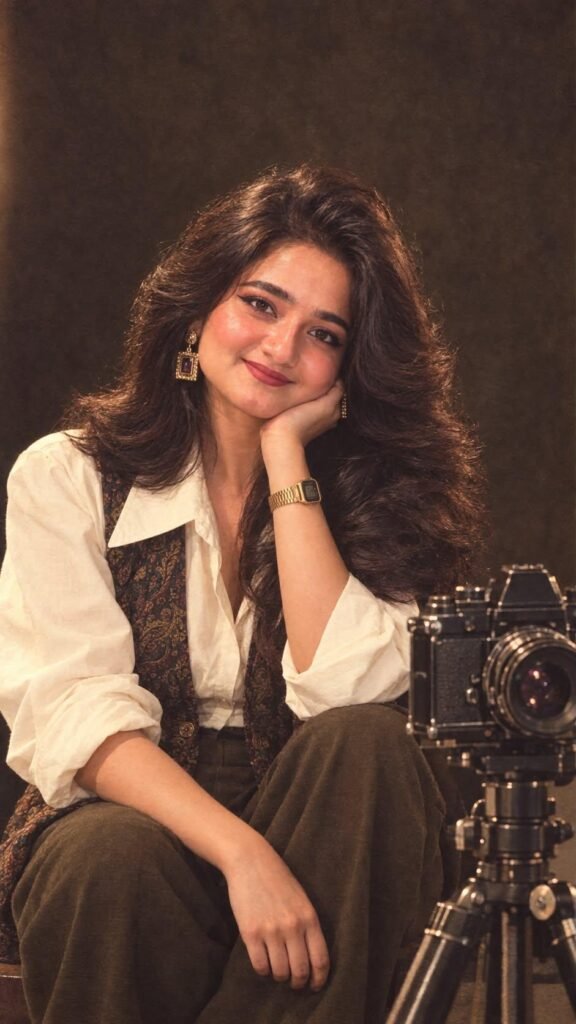
Short AI Image Prompt:Ultra-realistic 9:16 vintage 1980s fashion portrait of a young woman seated in a warm studio, wearing an ivory oversized blouse, patterned vintage waistcoat, and olive trousers. Voluminous feathered 80s blowout hair, soft winged eyeliner, warm blush, defined brows, and dusty-rose lipstick. Add elegant geometric gold 80s earrings and a retro gold digital watch. Relaxed pose with her cheek resting on one hand, soft confident smile, vintage film grain, warm cinematic lighting, dark textured backdrop, and a classic 80s film camera on a tripod in the foreground.
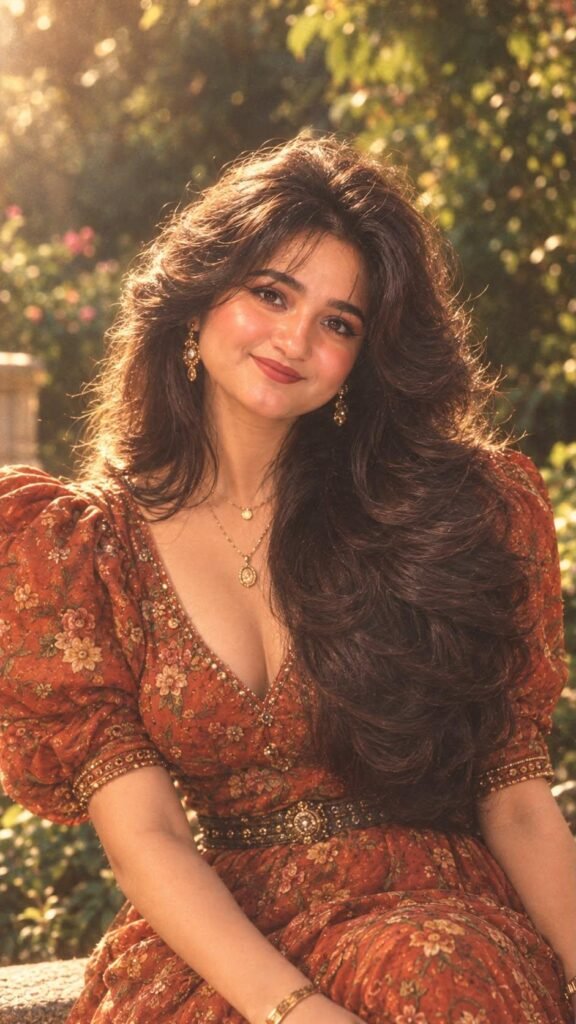
Short AI Image Prompt:Ultra-realistic cinematic 1980s vintage fashion portrait, vertical 9:16. Same woman with voluminous 80s feathered blowout hair, lifted crown and soft face-framing layers. Authentic 80s makeup—defined eyeliner, warm bronze-brown eyeshadow, rosy-peach blush, glowing skin, and warm terracotta/brick-rose satin lipstick perfectly matching her rust-orange floral dress. Elegant puff sleeves, intricate floral embroidery, embellished waist belt, layered gold jewelry. Warm golden-hour garden, lush greenery, dreamy bokeh, soft rim light, analog 35mm film grain, natural skin texture, luxurious retro editorial aesthetic.
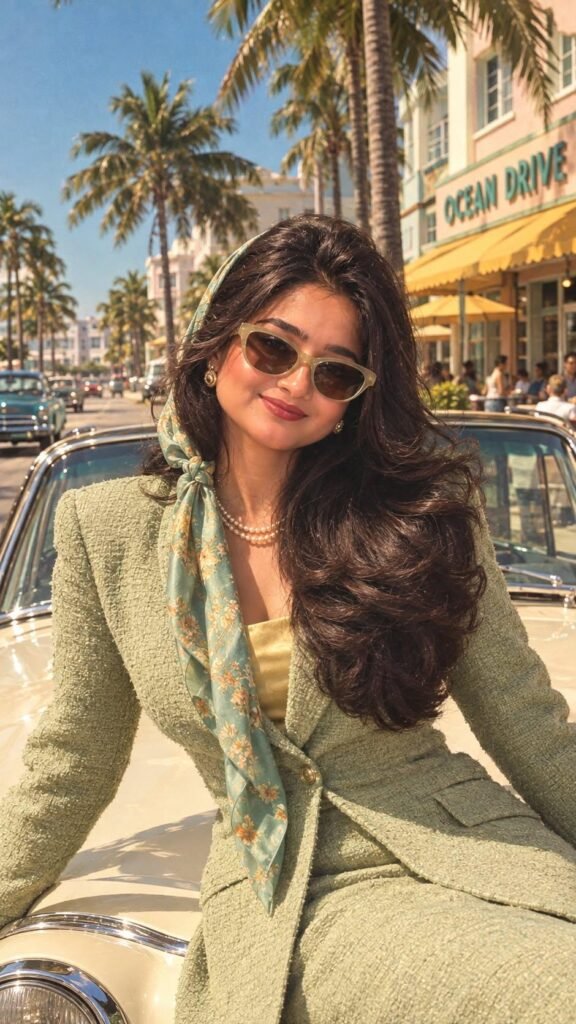
9:16 vintage fashion portrait, same face and features, voluminous brunette hair, pistachio-green blazer with golden top, turquoise floral scarf, pearl jewelry, and glamorous 80s makeup with bold eyeliner, warm blush, sculpted cheeks, and matching terracotta-red lipstick. Sunny retro street, cream vintage car, cinematic 35mm film grain, luxurious photorealistic editorial style.

Gemini Prompt
Retro Style Prompt for Gemini Girl
Transform the uploaded girl’s photo into a realistic retro Indian portrait. Preserve her original face and natural appearance. Give her an elegant vintage outfit, softly styled hair and simple traditional accessories. Use warm natural sunlight, an old textured wall and muted analogue colours. Add subtle film grain, soft focus and realistic skin texture. Make the photograph look naturally vintage rather than heavily filtered or cinematic.
Retro Style Prompt for Gemini Boy
Edit the uploaded boy’s photo into a realistic vintage Indian portrait. Keep his original facial features, skin tone and body proportions unchanged. Give him a classic retro outfit inspired by the 1980s or 1990s, with naturally styled hair. Place him against an old Indian street or textured wall with warm sunlight. Add subtle 35mm film grain, slightly faded colours and realistic photographic softness. Avoid modern objects and excessive effects.
Gemini AI Retro Couple Photo Prompt
Turn the uploaded couple photo into a nostalgic Indian retro photograph. Preserve both people’s original faces, skin tones, expressions and natural proportions. Style the woman in an elegant vintage saree with simple jewellery and the man in a classic retro outfit. Place them in an old Indian street or vintage studio setting. Use warm sunlight, soft shadows, faded analogue colours and subtle film grain. Keep their pose natural and affectionate. The final image should look like a genuine old photograph rather than a modern photo with a filter.
Retro Couple Prompt
Create a soft and romantic retro-style photograph from the uploaded couple image. Keep both faces natural and recognisable. Use vintage Indian clothing, an aged architectural background, warm afternoon lighting and subtle analogue film grain. Add gentle colour fading and realistic skin texture. Keep the composition simple, authentic and photographic, with no modern objects in the background.
Gemini Retro Prompt for Family Photo
Transform this family photograph into a warm vintage Indian family portrait. Preserve everyone’s original facial features and natural proportions. Use traditional, period-appropriate clothing and an old Indian home or studio background. Add soft warm lighting, muted colours, subtle film grain and realistic photographic imperfections. Keep everyone looking natural and avoid modern furniture, phones, vehicles or other contemporary objects.
Gemini Prompt for Retro Style
Give the uploaded photo a classic retro-film appearance while keeping the subject unchanged. Use warm analogue lighting, muted colours, subtle 35mm film grain, soft contrast, slight lens softness and realistic skin texture. Add a simple vintage Indian environment and remove modern visual elements. The final result should look like a naturally captured film photograph.
Gemini AI Retro Saree Prompt
Edit the uploaded photo into a beautiful vintage Indian saree portrait. Preserve the woman’s original face, facial structure and natural skin tone. Dress her in an elegant traditional saree with a classic blouse, minimal jewellery and softly styled wavy hair. Use an old textured wall, warm natural sunlight and soft shadows. Add subtle film grain, slightly faded colours and realistic photographic texture. Keep the image authentic and avoid excessive glamour or artificial skin.
Retro Style Prompt for Gemini Girl in Saree
Transform the uploaded girl’s photo into a realistic retro Indian saree photograph. Keep her original face and natural features unchanged. Dress her in a graceful vintage saree with traditional jewellery and naturally styled hair. Place her in an old-fashioned Indian home or against a weathered wall. Use warm sunlight, soft shadows, muted colours and subtle analogue film grain. Make it look like a real family photograph from the past.
Gemini AI Retro 90s Prompt
Convert the uploaded photograph into a realistic 1990s Indian retro photo. Preserve the person’s original face and appearance. Use 90s-inspired clothing and hairstyle, an old Indian street or home setting, warm lighting, slightly faded colours and authentic film grain. Remove modern cars, smartphones and contemporary objects. Keep the result natural, nostalgic and photographic.
Gemini AI Retro 80s Prompt
Turn this photo into a realistic Indian 1980s film photograph. Preserve the original facial features and proportions. Use period-appropriate clothing, hairstyle and accessories, along with an old Indian setting. Add warm analogue lighting, moderate film grain, soft contrast and slightly faded colours. Avoid modern objects and make the photograph look naturally captured on film.
How to Make Gemini Retro Photos More Realistic
The most useful approach is to build the prompt around five elements: subject, clothing, background, lighting and photographic style.
For example, instead of writing “make this retro”, specify that the person should wear a vintage saree, stand beside an aged wall, have warm afternoon light and appear in a slightly faded 35mm film photograph.
It is also better to use subtle film grain. Too much grain, blur or sepia can make an image look like an artificial filter. Similarly, modern objects in an otherwise old-fashioned scene can immediately break the retro effect.
Gemini’s newer image-editing capabilities are designed to improve character consistency and allow users to make additional edits to an image through follow-up instructions.
If the face changes too much, add:
Keep the original person’s face, facial structure and identity unchanged. Modify only the clothing, background and photographic style.
If the first result is close but not perfect, make a small follow-up edit rather than changing the entire prompt.
Final Takeaway
A convincing Gemini retro photo is not simply an image with a brown or faded filter. The strongest results come from combining period clothing, an appropriate Indian setting, suitable lighting and authentic film characteristics. Whether you want a girl portrait, boy photo, couple image, family photograph or saree look, a focused prompt gives Gemini clearer instructions and more control over the final result.