
Google Gemini AI Photo Editing Prompts for Side Mirror Reflection Photo 2026: Mirror reflection photos are becoming very popular because they look stylish for indian users. This type of image uses a car’s side mirror to create a different point of view instead of a normal selfie. Natural sunlight, soft wind, and a simple outfit help the photo look fresh and realistic. Small details like sunglasses, loose hair, and an urban background make the final result feel premium. If you want to create a similar image with Gemini AI, you only need the right settings and a clear idea of the style you want.
How to Create This Image with Gemini AI
Step 1: Open Gemini AI and go to the image generation section.
Step 2: Select the 9:16 image ratio so the picture is ready for Reels, Stories, and Shorts.
Step 3: Describe the scene clearly. Mention the side mirror reflection, natural light, fashionable outfit, moving hair, sunglasses, and an outdoor city background.
Step 4: Choose a realistic photography style instead of an illustration or cartoon look.
Step 5: Generate the image and check the first result carefully.
Step 6: If the reflection, face, or lighting does not look natural, generate another version until you get a clean result.
Step 7: Save the best image and use it for your social media posts, blog, or creative projects. It is also a good idea to make small edits like brightness or contrast if needed before sharing.
BMW Car Trending video

Ultra-Realistic Mercedes Camera Video
Prompt for Trending kajal face image

Create an ultra-realistic vertical 9:16 portrait inspired by the reference. A young South Asian woman is seen through a mirror, applying black kajal/eyeliner to her eye with a relaxed, candid expression. She wears a black saree with intricate silver embroidery and a sheer patterned pallu, paired with ornate silver jhumka earrings. Her dark hair is styled in a soft, voluminous low bun adorned with white jasmine flowers, with a few natural loose strands framing her face. She has subtle traditional makeup, a small black bindi, a tiny nose stud, natural skin texture, and muted rosy-red lips.Warm, dim indoor lighting creates a moody vintage atmosphere, with realistic shadows and reflections. The mirror frame partially obscures the composition, making it feel like a genuine candid photograph. Natural skin texture, realistic hair strands, authentic proportions, slight imperfections, soft smartphone-camera quality, no artificial smoothing, no overly polished or AI-generated appearance.9:16

Short AI prompt: Ultra-realistic 4K/8K 9:16 close-up portrait of a young South Asian woman looking directly at the camera with a soft smile, natural dewy skin, subtle winged eyeliner, mauve lipstick, minimal nose stud, voluminous center-parted low updo with soft face-framing strands, delicate earrings and pendant, elegant ivory-and-blue floral embroidered ethnic outfit with dupatta, brown leather watch, warm indoor lighting, dark blurred bokeh background, authentic skin texture, photorealistic Instagram aesthetic.
9:16 ratio
Spider Man prompt for Gemini AI
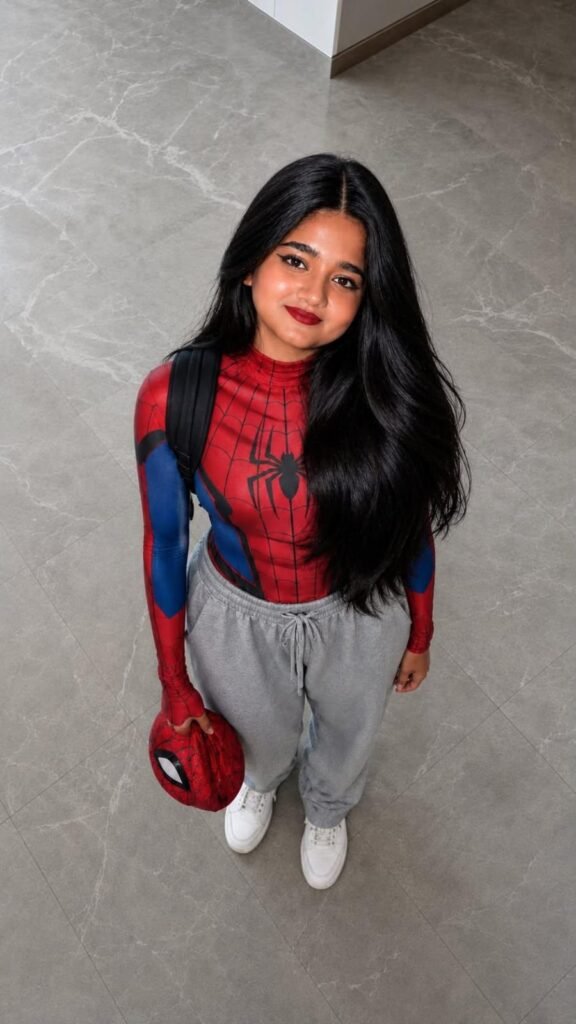
1st image-
A candid, high-angle smartphone shot of a Gen Z woman looking up with a deadpan expression. He is wearing a sleek black and red athletic compression shirt with a subtle web pattern and a red arachnid logo, paired with extremely baggy black sweatpants and classic high-top sneakers. He wears a black backpack with a small “(enter your name)” patch and is holding a white next-gen gaming controller in his hand. Neon-lit bedroom floor, photorealistic street-style 9:16.
2nd image
A mirror selfie in a modern, moody room. A young woman wears a metallic dark blue and red athletic long-sleeve featuring an aggressive, skull-like spider emblem on the chest. She pairs this high-tech top with oversized silver parachute pants and chunky sneakers. A sleek white gaming console and monitor sit on a desk in the background. Edgy, futuristic casual streetwear aesthetic.
9:16